
What is a Speedle policy?
The Policy Management Service (PMS) manages services, authorization policies, role policies and custom functions. A policy store persists those objects using a registered storage backend.
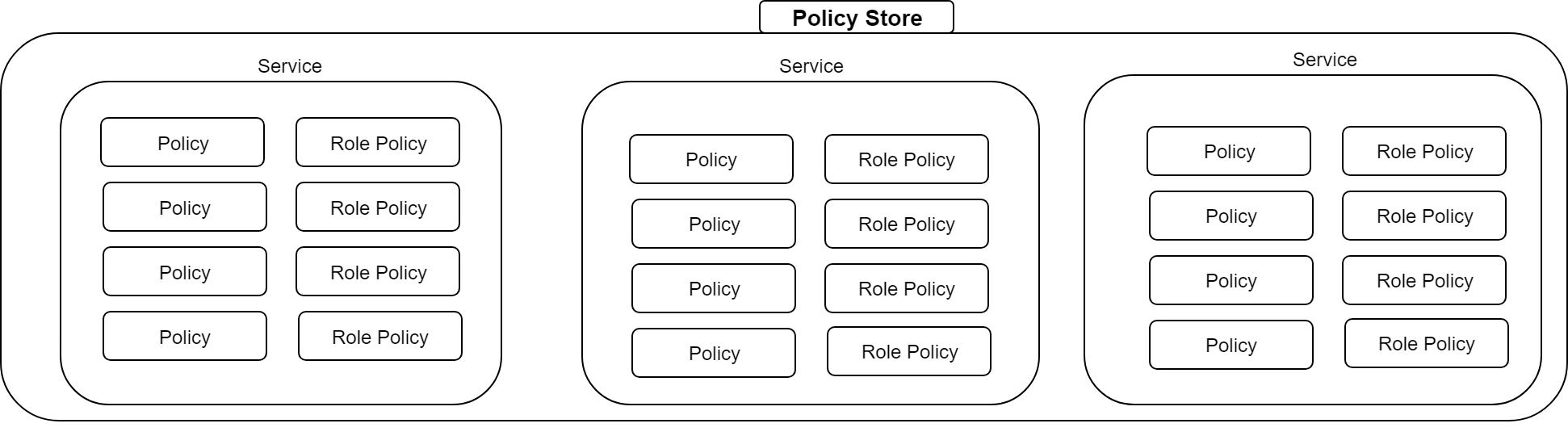
Services and authorization policies
A service scopes its policies. An authorization policy grants or denies a principal permission to perform an action on a resource, optionally subject to a condition. Except for global role policies, policies do not automatically apply in another service.
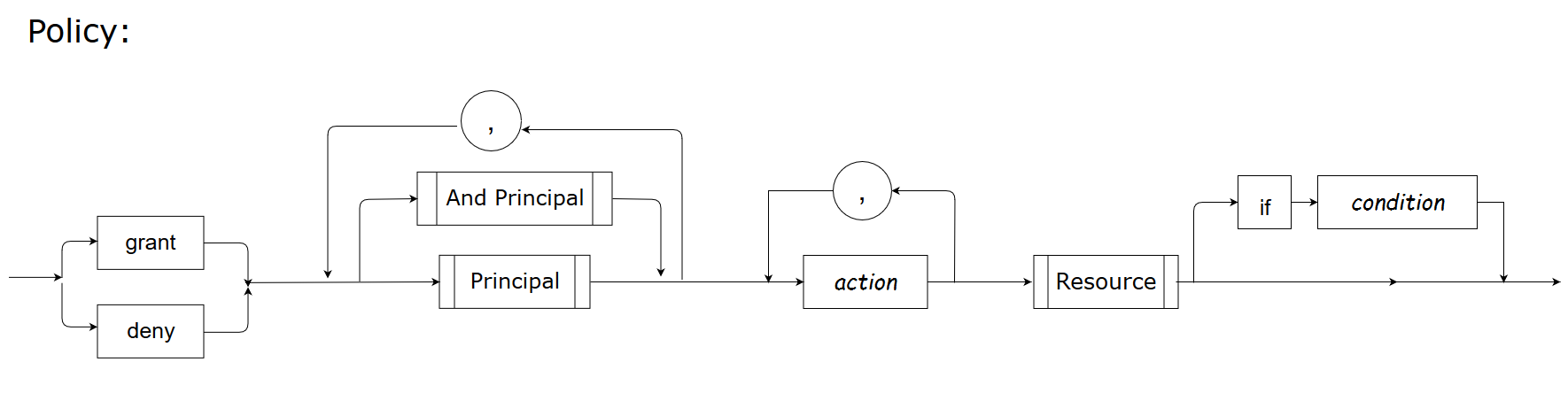
grant group Administrators list,watch,get expr:^c1/default/core/pods/.*$This regular expression matches resources under c1/default/core/pods/. It does not match c1/default/core/podssecret or an extra prefix before c1. expr: uses regular-expression matching, not shell globs: use .* for arbitrary characters and ^/$ when the complete identifier must match.
Role policies
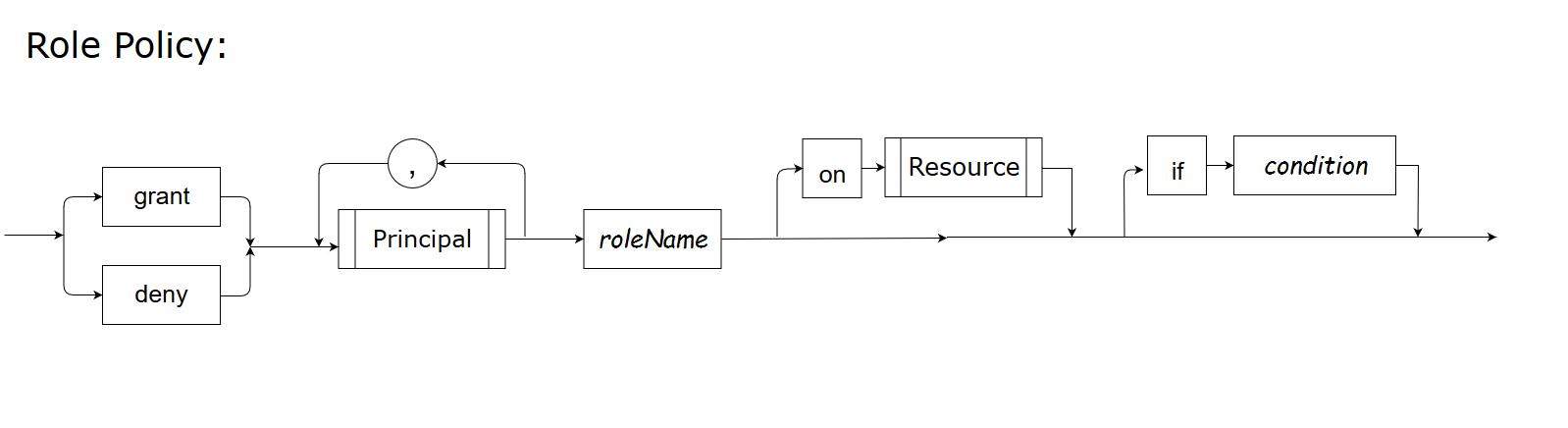
grant user alan manager on res1
grant role manager update res1
The first statement assigns Alan a resource-scoped role; the second grants that role an operation. Assigning a role alone does not create permissions. An applicable explicit deny overrides a grant.
Principals and conditions
A principal may be a user, group, entity or role. An entity represents a non-human identity, such as a service. Integrations must derive these identities from trusted sources.
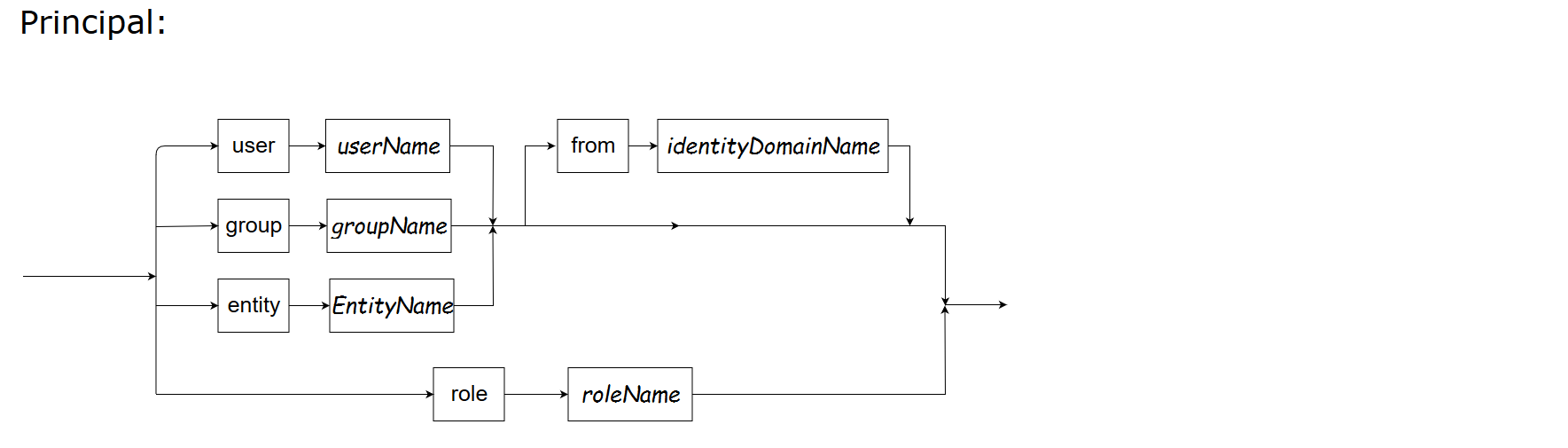
An AND group requires every listed principal; separate groups are alternatives. For example, both roles below must apply:
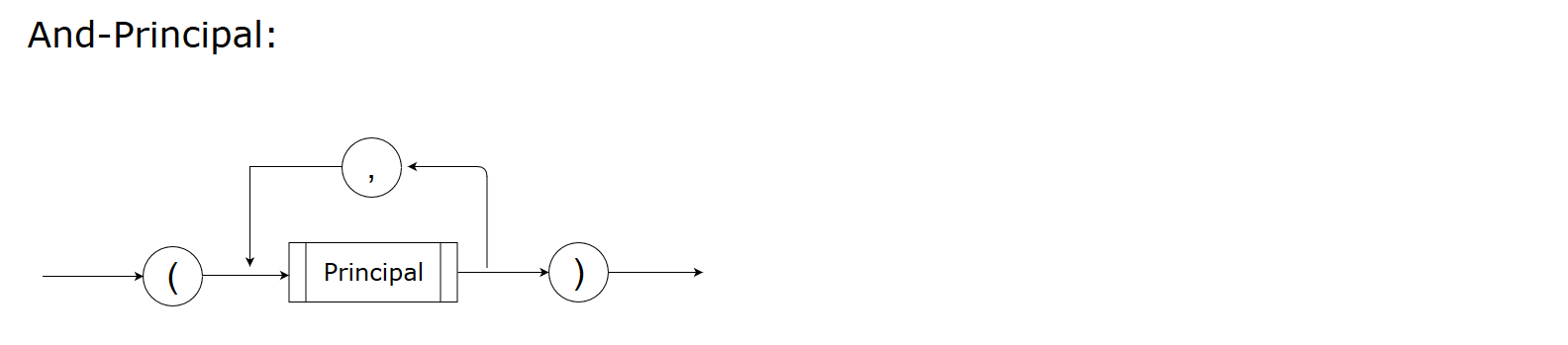
grant (role designer, role dba) update db_design_docA resource names the protected object; an action names an application operation. A condition is a Boolean expression evaluated from trusted attributes, constants, operators and supported functions.
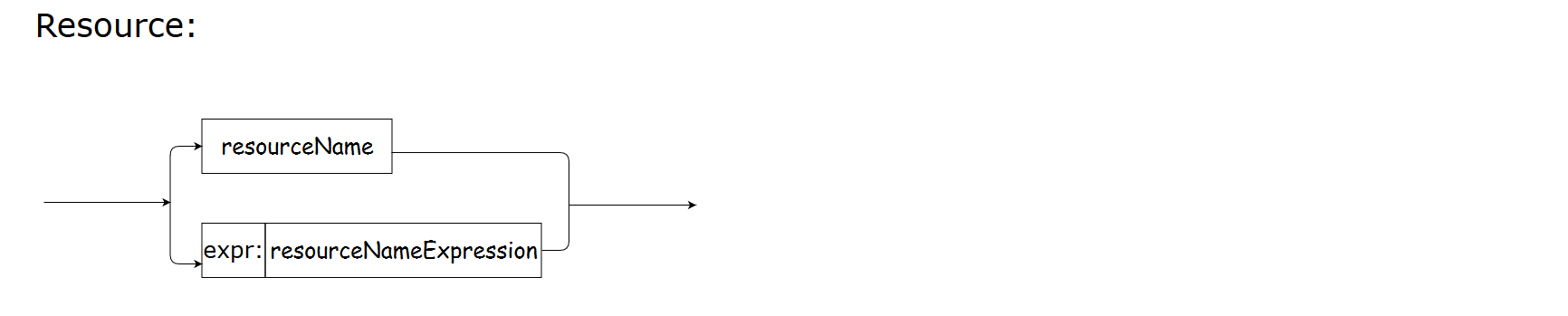
See SPDL for grammar and RBAC/ABAC for complete decision examples.
Before running the examples
Build ./bin/spctl, ./bin/speedle-pms and ./bin/speedle-ads using the quick start. Use Go 1.26.10 or Go 1.27.3 (or a newer patch on the same release branch), Bash, curl and Python 3. Run each terminal from the repository root. Use a fresh policy file for this page; reset it only after stopping both services.
Initialize an empty policy file:
printf '{}\n' > docs-policies.jsonIn terminal one, start PMS and leave it running:
./bin/speedle-pms --store-type file --filestore-loc ./docs-policies.json --endpoint 127.0.0.1:6733 --grpc-endpoint 127.0.0.1:0 --insecure=trueIn terminal two, start ADS and leave it running:
./bin/speedle-ads --store-type file --filestore-loc ./docs-policies.json --endpoint 127.0.0.1:6734 --grpc-endpoint 127.0.0.1:0 --insecure=trueRun the remaining commands in a third terminal. PMS and ADS share the file; watch propagates changes asynchronously. Confirm the intended update has reached ADS before relying on it. --insecure=true is only for this loopback example; see security for production connections. Explicit PMS addresses avoid changing ~/.spctlconfig. Stop both server terminals with Ctrl-C when finished.
Manage services and policies with spctl
Run this sequence against a fresh store. IDs come from the live query responses; they are not fixed values copied from an older run. Deletion happens after all operations that need the service.
./bin/spctl --pms-endpoint http://127.0.0.1:6733/policy-mgmt/v1/ create service test
./bin/spctl --pms-endpoint http://127.0.0.1:6733/policy-mgmt/v1/ get service test
./bin/spctl --pms-endpoint http://127.0.0.1:6733/policy-mgmt/v1/ get service --all
./bin/spctl --pms-endpoint http://127.0.0.1:6733/policy-mgmt/v1/ create policy policy1 -c "grant user alan read book" --service-name test
policy_id=$(./bin/spctl --pms-endpoint http://127.0.0.1:6733/policy-mgmt/v1/ get policy --all --service-name test | python3 -c 'import json,sys; print(next(p["id"] for p in json.load(sys.stdin) if p.get("name")=="policy1"))')
./bin/spctl --pms-endpoint http://127.0.0.1:6733/policy-mgmt/v1/ get policy "$policy_id" --service-name test
./bin/spctl --pms-endpoint http://127.0.0.1:6733/policy-mgmt/v1/ create rolepolicy rolepolicy01 -c "grant user alan manager on res1" --service-name test
role_policy_id=$(./bin/spctl --pms-endpoint http://127.0.0.1:6733/policy-mgmt/v1/ get rolepolicy --all --service-name test | python3 -c 'import json,sys; print(next(p["id"] for p in json.load(sys.stdin) if p.get("name")=="rolepolicy01"))')
./bin/spctl --pms-endpoint http://127.0.0.1:6733/policy-mgmt/v1/ get rolepolicy "$role_policy_id" --service-name test
./bin/spctl --pms-endpoint http://127.0.0.1:6733/policy-mgmt/v1/ delete policy "$policy_id" --service-name test
./bin/spctl --pms-endpoint http://127.0.0.1:6733/policy-mgmt/v1/ delete rolepolicy "$role_policy_id" --service-name test
./bin/spctl --pms-endpoint http://127.0.0.1:6733/policy-mgmt/v1/ delete service test
Other interfaces
The PMS REST API uses JSON and returns flat policy objects with string IDs. Go applications can call the PMS interfaces directly; gRPC clients use the published PMS proto. Apply transport and caller access controls to administrative operations.